Document Service API: ミドルウェア
Document Service APIは、ミドルウェアのおかげでその振る舞いを拡張する能力を提供します。
Document Serviceのミドルウェアは、メソッドが実行される前と/または後にアクションを実行することを可能にします。
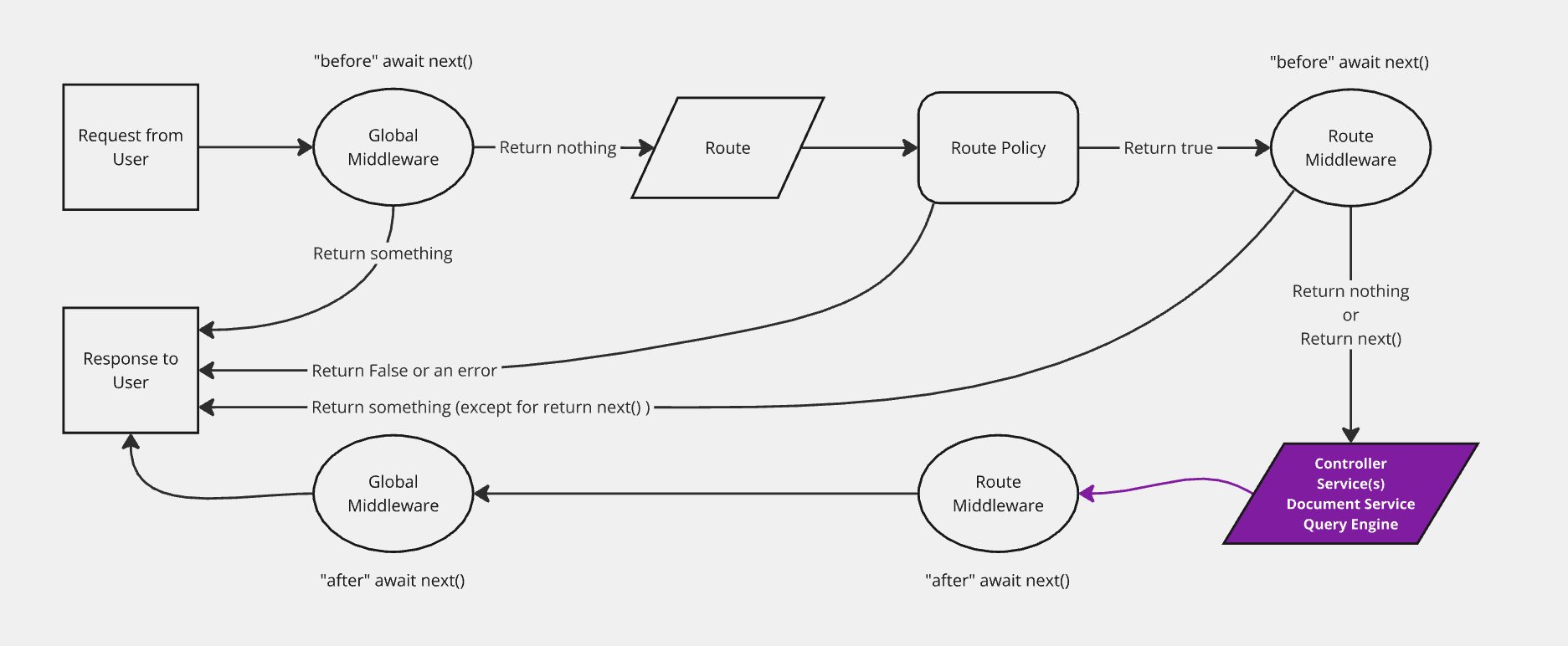
ミドルウェアの登録
構文: AI Marketer.documents.use(middleware)
パラメータ
ミドルウェアは、コンテキストと次の関数を受け取る関数です。
構文: (context, next) => ReturnType<typeof next>
| パラメータ | 説明 | タイプ |
|---|---|---|
context | ミドルウェアのコンテキスト | Context |
next | スタック内の次のミドルウェアを呼び出す | function |
context
| パラメータ | 説明 | タイプ |
|---|---|---|
action | 実行中のメソッド (利用可能なメソッドを参照) | string |
params | メソッドのパラメータ (利用可能なメソッドを参照) | Object |
uid | コンテンツタイプの一意の識別子 | string |
contentType | コンテンツタイプ | ContentType |
例:
以下の例は、呼び出されたメソッドによってcontextが含む可能性があるものを示しています:
- findOne
- findMany
- delete
{
  uid: "api::restaurant.restaurant",
  contentType: {
    kind: "collectionType",
    collectionName: "restaurants",
    info: {
      singularName: "restaurant",
      pluralName: "restaurants",
      displayName: "restaurant"
    },
    options: {
      draftAndPublish: true
    },
    pluginOptions: {},
    attributes: {
      name: { /*...*/ },
      description: { /*...*/ },
      createdAt: { /*...*/ },
      updatedAt: { /*...*/ },
      publishedAt: { /*...*/ },
      createdBy: { /*...*/ },
      updatedBy: { /*...*/ },
      locale: { /*...*/ },
    },
    apiName: "restaurant",
    globalId: "Restaurants",
    uid: "api::restaurant.restaurant",
    modelType: "contentType",
    modelName: "restaurant",
    actions: { /*...*/ },
    lifecycles: { /*...*/ },
  },
  action: "update",
  params: {
    documentId: 'hp7hjvrbt8rcgkmabntu0aoq',
    data: { /*...*/ },
    status: "draft",
    populate: { /*...*/ },
  }
}
{
  uid: "api::restaurant.restaurant",
  contentType: {
    kind: "collectionType",
    collectionName: "restaurants",
    info: {
      singularName: "restaurant",
      pluralName: "restaurants",
      displayName: "restaurant"
    },
    options: {
      draftAndPublish: true
    },
    pluginOptions: {},
    attributes: {
      name: { /*...*/ },
      description: { /*...*/ },
      createdAt: { /*...*/ },
      updatedAt: { /*...*/ },
      publishedAt: { /*...*/ },
      createdBy: { /*...*/ },
      updatedBy: { /*...*/ },
      locale: { /*...*/ },
    },
    apiName: "restaurant",
    globalId: "Restaurants",
    uid: "api::restaurant.restaurant",
    modelType: "contentType",
    modelName: "restaurant",
    actions: { /*...*/ },
    lifecycles: { /*...*/ },
  },
  action: "update",
  params: {
    data: { /*...*/ },
    documentId: 'hp7hjvrbt8rcgkmabntu0aoq',
    locale: undefined,
    status: "draft"
    populate: { /*...*/ },
  }
}
{
  uid: "api::restaurant.restaurant",
  contentType: {
    kind: "collectionType",
    collectionName: "restaurants",
    info: {
      singularName: "restaurant",
      pluralName: "restaurants",
      displayName: "restaurant"
    },
    options: {
      draftAndPublish: true
    },
    pluginOptions: {},
    attributes: {
      name: { /*...*/ },
      description: { /*...*/ },
      createdAt: { /*...*/ },
      updatedAt: { /*...*/ },
      publishedAt: { /*...*/ },
      createdBy: { /*...*/ },
      updatedBy: { /*...*/ },
      locale: { /*...*/ },
    },
    apiName: "restaurant",
    globalId: "Restaurants",
    uid: "api::restaurant.restaurant",
    modelType: "contentType",
    modelName: "restaurant",
    actions: { /*...*/ },
    lifecycles: { /*...*/ },
  },
  action: "delete",
  params: {
    data: { /*...*/ },
    documentId: 'hp7hjvrbt8rcgkmabntu0aoq',
    locale: "*",
    populate: { /*...*/ },
  }
}
next
nextは、スタック内の次のミドルウェアを呼び出し、そのレスポンスを返すパラメータなしの関数です。
例
AI Marketer.documents.use((context, next) => {
  return next();
});
登録する場所
一般的に、あなたはAI Marketerの登録フェーズ中にミドルウェアを登録するべきです。
ユーザー
ミドルウェアは一般的な register() ライフサイクルメソッドで登録する必要があります:
/src/index.js|ts
module.exports = {
  register({ AI Marketer }) {
    AI Marketer.documents.use((context, next) => {
      // あなたのロジック
      return next();
    });
  },

  // bootstrap({ AI Marketer }) {},
  // destroy({ AI Marketer }) {},
};
プラグイン開発者
ミドルウェアはプラグインの register() ライフサイクルメソッドで登録する必要があります:
/(plugin-root-folder)/AI Marketer-server.js|ts
module.exports = {
  register({ AI Marketer }) {
    AI Marketer.documents.use((context, next) => {
      // あなたのロジック
      return next();
    });
  },

## ミドルウェアの実装

ミドルウェアを実装する際は、常に`next()`からのレスポンスを返すようにしてください。
これを怠ると、AI Marketerアプリケーションが壊れます。

### 例

```js
const applyTo = ['api::article.article'];

AI Marketer.documents.use((context, next) => {
  // 特定のコンテンツタイプのみで実行
  if (!applyTo.includes(context.uid)) {
    return next();
  }

  // 特定のアクションのみで実行
  if (['create', 'update'].includes(context.action)) {
    context.params.data.fullName = `${context.params.data.firstName} ${context.params.data.lastName}`;
  }

  const result = await next();

  // 返す前に結果で何かをする
  return result
});
:::AI Marketer ライフサイクルフック Document Service APIは、呼び出されるメソッドに基づいて、さまざまなデータベースライフサイクルフックをトリガーします。完全なリファレンスについては、Document Service API: ライフサイクルフックを参照してください。 :::